2009年6月5日星期五

Submit data to multi-dataset/multi-source with web-based reporting tool — RAQ Report


Background


When developing data input module based on web, users always have to provide a data submission solution. The complexity of the solution is determined by the complexity of the input web-page.

Some conditions in an increasingly complex order are showed below:
1. There is only one record on the web-page.
2. Records correspond to a table of a database.
3. Records correspond to many tables of a database.
4. Records correspond to many tables of different databases.

Difficulty


1. Keep the transactional database consistency, especially when there are several databases.

2. Convert data type. The type of submitted data from web page is unrecognized; as a result, it has to be converted to proper type in database in the background.

3. Update the mapping relationship between field and the input cell on web page, especially a record corresponds to several cells indifferent expansion regions, or a field corresponds to a expression composed by several cells.

Someone may say that all these difficulties can be solved by writing program. However, the program has no commonality, and the workload will be huge.

Solution


RAQ Report is a professional web-based reporting tool. For users’ convenience, RAQ Report provides an almost perfect data submission solution: Multiple Database/Dataset Input Report.

With the Multiple Datasource/Dataset Input Report solution of RAQ Report, users can relate different tables from different databases, and submit data to multiple tables/databases, and keep the transactional consistency of database easily.

Easy Operation


1. Design an input report.
2. Define the Update attribute of the report. As shown below:
Define Update attribute of the RAQ Report
3. Release the report.

Source: Knowledge Base of RAQ Report
Original Post: Submit data to multi-dataset/multi-source with web-based reporting tool - RAQ Report
Related Articles:
Six Quick Crystal Reports Design Tips;
Evaluation-Time functions in Crystal Reports Formulas;
Keep the matching between code and display value in reporting tool;
Writing to a database from Report Studio;
Useful Links:
Knowledge Base of RAQ Report;
Freezea’s Report Lesson;
Java Products and software download;
Vara Prasad S Manjula’s Blog;
Jackson’s Reporting Review

Tag after data input module, multi data source, multi dataset, RAQ Report, transactional database consistency, web-based reporting tool

clip_image001RAQSOFT: Innovative Techology Makes Progress.


For more about reporting tool, you are welcome to refer to freezea's blog.

2009年5月31日星期日

Video: Inside The Google Holodeck

At this past week’s Google I/O event in San Francisco, Google brought a contraption it calls the “Holodeck,” for event-goers to experience. Basically, it’s a near-360 degree way to view Google Street View in fast motion, high definition video. Danny Sullivan posted a bunch of pictures of the thing earlier in the week.

Unfortunately, Google only allows it to show the area at and around the actual Google campus in Mountain View, as I’m sure it doesn’t want any legal complaint from those caught sunbathing in their backyards. Also, while it does zoom past the area where the Google Goats were kept, it unfortunately failed to catch any of them on tape. Luckily, I did that for you a few weeks ago.

Google’s Holodeck isn’t quite as cool as the Star Trek Holodeck, but give them a few years, I’m sure they’ll figure out how to do that as well.

2009年5月30日星期六

Data input solution after changing data source dynamically in RAQ Report

Problem


Sometimes, users may change the data source of input report template through RAQ Report API dynamically. However, after releasing the input report template with tag, an error message “Can’t find data source!” usually appears when users are inputting data in the web page.

Analysis


Through API of RAQ Report, users can only change the name of the data source of report template dynamically, but not change the data source in updated attribute correspondingly. As a result, the data sources in input template and updated attribute are different. Then, when users are inputting data, the system can’t find correct data source, and an error message pops up.

Solution


After changing the data source of report template, users should change the data source of updated attribute correspondingly.

With RAQ Report, users only need to get the corresponding relations between input report attribute and updated attribute, and change the data source of updated attribute.

Example

ReportDefine rd = (ReportDefine)ReportUtils.read(raq);
INormalCell cell = rd.getCell(2, (short)1);
//Get input report attributes.
InputProperty ip = cell.getInputProperty();
ArrayList al = ip.getUpdateList();
UpdateProperty up = (UpdateProperty)al.get(0);
//Get corresponding relations between input report attribute and updated attribute.
Object relations = up.getRelation();
if(relations instanceof com.runqian.report4.usermodel.input.TableRelations){
TableRelations trs = (TableRelations)relations;
System.out.println(trs.getDataSourceName());
//Set the data source of updated attribute.
trs.setDataSourceName("northwind");
up.setRelation(trs);
ArrayList ups = new ArrayList(1);
ups.add(up);
ip.setUpdateList(ups);
cell.setInputProperty(ip);

Source: Knowledge Base of Java Reporting Tool
Original Post: Data input solution after changing data source dynamically in RAQ Report
Related Articles:
Submit data to multi-dataset/multi-source with web-based reporting tool — RAQ Report;
Make drop-down calendar for web application with web reporting tool;
Design web report with graphical interface of reporting tool;
Wonderful solution for complex data input in web report ;
Useful Links:
Knowledge Base of Web Reporting Tool;
Reporting Insights from Raqman;
Live in Reporting;
Dynamic datasource selection for BIRT and e.Spreadsheets;

Tag after API, data input, data source, dynamic data source, input report, input report template, java, RAQ Report, web input, web reporting

clip_image001RAQSOFT: Innovative Techology Makes Progress.


For more about reporting tool, you are welcome to refer to freezea's blog.

2009年5月29日星期五

Analyse the error of database connection factory in web report development

Problem


For the users of web report tool, when developing web report, they need to configure dataset at first. When data source is complicated, they often want do some special handling to dataset. With the dataset factory listener class of RAQ Report, they can realize this idea.

However, users may meet a few problems in the use of dataset factory listener class. Next, we will introduce the common problems to help users to develop web report correctly with RAQ Report.

Error information


Error code 500 Message: : Failed to generate dataset factory: com.runqian.report4.dataset.SQLDataSetFactory Error source: : In dataset ds1, datasource report/core_epm is setted falsely or not running, please check data source: Abnormity: : Failed to generate dataset factory: com.runqian.report4.dataset.SQLDataSetFactory Error source: : In dataset ds1, datasource report/core_epm is setted falsely or not running, please check data source: at com.runqian.report4.model.CalcReport.calcDataSet(Unknown Source:317) at com.runqian.report4.usermodel.Engine.calc(Unknown Source:96) at ep.verify.expression.VerifyExpression.reportExpressionCalc(VerifyExpression.java:57) at ep.commons.init.InitShowReportParams.verifyReport(InitShowReportParams.java:63) at ep.commons.init.InitShowReportParams.(InitShowReportParams.java:43) at org.apache.jsp.reportJsp.showReport_jsp._jspService(showReport_jsp.java:68) at org.apache.jasper.runtime.HttpJspBase.service(HttpJspBase.java:133) at javax.servlet.http.HttpServlet.service(HttpServlet.java:856)

Possible Reasons


1. Check the contxet of public void beforeCreated method which is setted to the IDataSetFactoryListener interface. If there is only connection in it, you’d better to set dataset factory. Then, if the connection in context is closed, data can be got from dataset factory.

2. Print connection. If it isn’t empty, the reason may be that datasource is configured repeatedly. If data source information is configured in reportConfig.xml before, users are not allowed to configure it in custom codes again. Or else, it will report error. To solve the problem, users only need to delete those configuration codes.

Source: Knowledge Base of Java Reporting Tool
Original Post: Analyse the error of database connection factory in web report development
Related Articles:
Analyse the error of database connection factory in web report development;
Make cell unassailable to random content with reporting tool;
Built-in dataset: an innovation in reporting tool;
Keep the matching between code and display value in reporting tool ;
Useful Links:
Web Report Software;
Freezea’s Report Lesson;
Jackson’s Reporting Review;
Using a supplied connection with BIRT;

Tag after data source, database connection factory, dataset factory listener class, error analysis, free reporting tool, Java report, RAQ Report, web report, Web reporting tool

clip_image001RAQSOFT: Innovative Techology Makes Progress.


For more about reporting tool, you are welcome to refer to freezea's blog.

Better integration solution of Web reporting tool

Background


Report development is only a part of application program, therefore, the integration of Web reporting tool is of great importance.

All the traditional Web reporting tools provide an independent report server without exception. With an independent report server, the application architecture is shown below:

The application architecture of traditional reporting tool

The application architecture of traditional reporting tool

The disadvantages of an independent report server:
● The independent report server communicates with application program via network protocol, and this degrades system performance seriously.
● It is unable to use all the advantageous functions of application server, such as the cluster capability, the management capability of connection pool, etc.
● Report server has an independent management mechanism of user permissions, which can not adapt the requirements of particular user role management from various industries and applications. It is insufficient, while it force application program to obey its rules.
● With too few APIs and weak control, it is hard to integrate.

Solution


RAQ Report is a professional Web reporting tool.
As a pure Java reporting software, RAQ Report provides integration as Jar package to programmers. Without independent report server, application infrastructure, and independent management mechanism of user permissions, RAQ Report can help programmers to implement integration conveniently. Its application architecture is shown below:

The application architecture of RAQ Report

The application architecture of RAQ Report

The advantages of no independent report server:
● The server of RAQ report is submitted as Jar package or application of application server. Therefore, it can get integrated with application program seamlessly to achieve the peak operating efficiency.
● Share the cluster capability and the management capability of connection pool of application server.
● Make unified deployment. Use the user role management mechanism of Web application directly to avoid the incompatible problem of two management mechanisms. Provide a unified login screen, and end users need not to log in twice.

Source: Knowledge Base of Web Reporting Tool
Original Post: Better integration solution of Web reporting tool
Related Articles:
How to arrange card type reports with ease?;
Input type of RAQ Report;
Which one is better for reporting tool: open source or charge?;
Keep the matching between code and display value in reporting tool;
Useful Links:
Excel-like Web-based Java Reporting Tool;
Freezea’s Report Lesson;
Insights from Raqman;
Live in Reporting;
Jackson’s Reporting Review

Tag after Java reporting software, RAQ Report, Report Deployment, Web reporting tool

clip_image001RAQSOFT: Innovative Techology Makes Progress.


For more about reporting tool, you are welcome to refer to freezea's blog.

2009年5月13日星期三

Contenture Wants To Fail Whale Your Ad Network

The web is increasingly filling up with ads. Many sites, including this one, have a bunch of them all around with the hopes that you’ll find one relevant to you, and click on it. Of course, most of you don’t. And if you do, it may be by accident. As you can tell, I’m not exactly bullish on the model. But the problem is that there are few alternatives. Contenture is trying to offer one.
The service has been getting some buzz over the past few months, but mostly because no one seemed to know what the hell it was all about. An email today finally revealed their model. Contenture wants to be the “anti-ad network.” What it means by that is that it wants sites to adopt their monthly-fee based network to offer visitors the option to do things like turn off ads. Yes, this would basically turn your site to the subscription-based model.
But there’s a somewhat interesting twist. Contenture wants to sign up a bunch of sites to this model and have users pay one flat monthly fee to have access to all of these sites. That money would then be distributed to all of these sites. These sites could determine what Contenture subscribers get as a part of their subscription. Some may lose the ads, some may have special commenting ability, etc.
A similar model has been tried by the likes of TipJoy and others, but grouping sites together and offering users a place to pay one-fee for multiple sites is interesting if nothing else. Plus the site has a comic homepage that features a drunk Twitter Fail Whale and makes fun of its competitors. That’s pretty cool in our book.
The service is still in private beta testing, but apparently it’s getting ready to launch on May 21.

Don’t let sub report uglifies your report

Background


In Web Report, Sub report is a inportant technology, which is used to deal with some complex reports that can’t be achieved by basic models. In other words, you can design a relatively independent part of a report as a sub report, and add it to the main report.

For users’ consideration of report’s neatness, it’s very important to align the gridlines of main report and sub report.

Then, is it easy? No.

Difficulty


For traditional reporting tools, the report frame is built on some basic controls. As this type of reporting tools is not Excel-like/grid-shaped construction, it is impossible to design accurate aligned gridlines.

For new grid-shaped reporting tools, the report frame is formed by straight lines. As they have a real construction of the gridline, if they follow the method of the traditional-control reporting tools (it’s called embedded), unaligned gridlines will bring down the neatness and beauty of report, and even affect the reusing of the report. For example, report data with unaligned gridlines can’t be organized in the form of Excel or export to Excel.

In aligning gridlines, the biggest difficulty is how to align rows and columns between main report and sub report.

Solution


As a real Excel-like reporting tool, RAQ Report pays great attention to details in report design. With the combination of cell expansion and sub report model, RAQ report made the model of Imported Sub Report. With imported sub report, users can align gridlines easily.

Easy Operation


1. Design main report and sub report separately.

2. Import the sub report into the main report, and select the import type: Imported.
Import the sub report into the main report in RAQ Report

3. Browse and release it.

Graphic illustration


Gridline are aligned in two sub reports of RAQ Report

Source: Knowledge Base of Web Reporting Tool
Original Post: Don’t let sub report uglifies your report
Related Articles:
Dynamic appearance can make a report seems clearer;
7 shortnesses of displayTag;
Implementing IReportServerCredentials Interface;
Crystal Reports and SQL Server CE;
Useful Links:
Excel-like Web-based Java Reporting Tool;
Freezea’s Report Lesson;
Jason Irwin dot Net;
a developer’s breadcrumb;

Tag after align gridlines, insert sub report, RAQ Report, sub report, web report design, web report Java reporting tool

clip_image001RAQSOFT: Innovative Techology Makes Progress.


For more about reporting tool, you are welcome to refer to freezea's blog.

2009年5月11日星期一

Google News Gets An Update. Still Sucks.

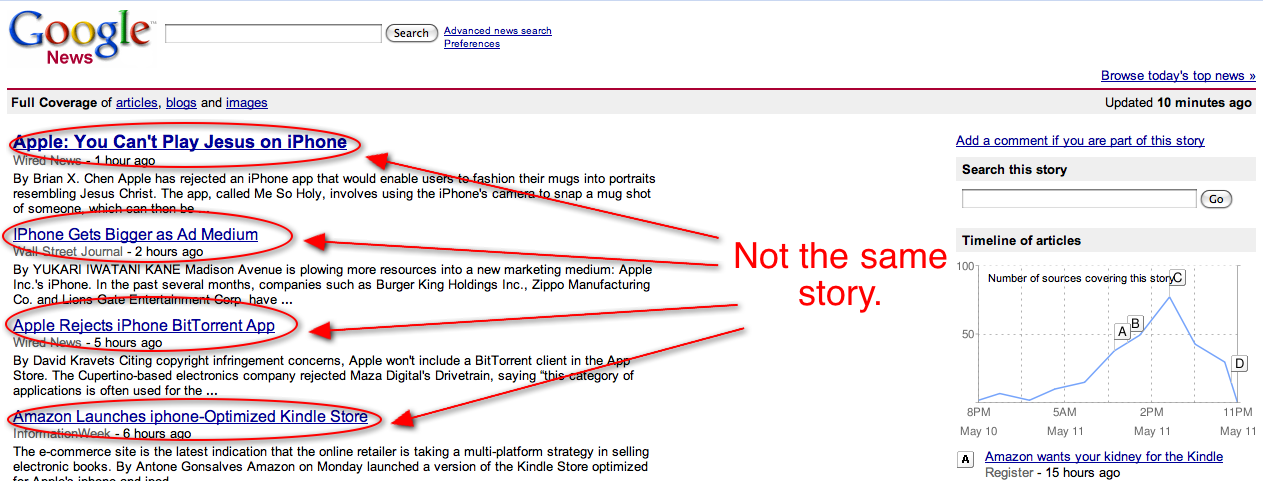
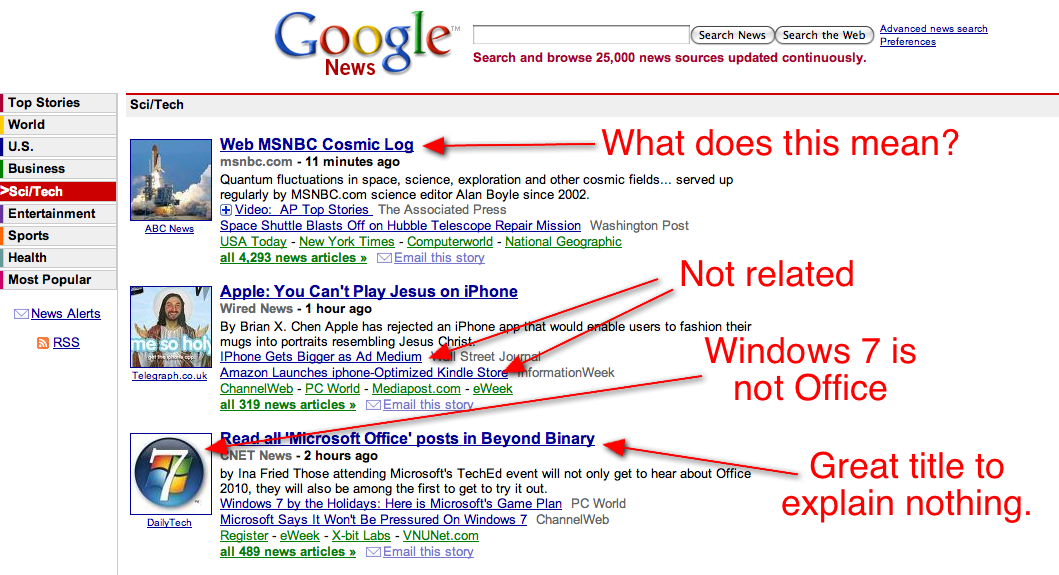
I’m sorry, but for as good as Google is at organizing the world’s data, Google News absolutely sucks. Now, to be fair, I’m going to focus on Google News from a tech news perspective, because that’s what I follow. Maybe it’s better in other areas, but I doubt it’s much better. I bring this up because a new update to the service today promised “More ways to see the story.” Okay, that’s true, as long as you don’t mind seeing stories that range from partially unrelated to entirely unrelated.
Now, when you click on the “all XXXX news articles” link below each story cluster in Google News, you are taken to a page with a range of content. This includes not only major publication headlines, but blog headlines, picture thumbnails, a timeline of articles on the topic, and even quotes about the topic. The problem, as you can see in my screenshots below, is that Google cannot seem to cluster stories together correctly.
If it sees a story is about say, a religious app being banned on the iPhone, it will cluster that with a story about iPhone ad data — even though the two are not the same story at all. Yet when you click to go to the new area, it indicates that they are the same story, as you can do things like “Search the story.” On any given day there are probably a dozen different stories about the iPhone (at least), and I guess it’d be fine (but silly) if Google wants to cluster them all together. But it doesn’t even do that. There are several clusters containing iPhone items. It seems to be just random which ones go where.

The problem is that Google uses an algorithm to do this clustering. As the vastly superior news aggregator Techmeme, learned quite a while ago, there needs to be some human curation involved. While an algorithm may not be able to see the difference in iPhone stories (or Microsoft stories, or anything else in my example below for that matter), a human could.
Further, the biggest problem with Google News when it comes to tech news is that many of the items that appear are laughably old. It’s fine if you want to say it’s for the masses to get a better overview of what’s going on, but at least indicate that these topics aren’t breaking items just because some site decided to write about it again a day or two days or a week after someone else published the story first.

The timeline view kind of indicates the age of a story, but if you see it’s far from its peak, then don’t make it a top item on Google News. Almost all of the top items right now are far from their peaks.
I could go on. Many of the headlines Google News chooses to use are complete nonsense and give readers absolutely no idea what a story is about. And the excerpts below the titles are often a gibberish mixture of author names, cities the story is based in and random links that don’t appear as links in the excerpts — giving you excepts like, “By Austin Modine Get more from this author Facebook has once again.” Brilliant.

2009年5月10日星期日

Make title area always aligned with data area in web report

Background


Have you ever experienced this case? When designing a web report, the column number of data area is less than that of title area. But after expansion, the column number of data area is much bigger than that of title area in display. As a result, the web report seems irregular.

Example


Take a cross report with horizontal expansion as an example. The design interface is shown below:
Original cross tab report of raq report before expansion

In design, the data area has only 4 columns, while the title area has 5 columns.

After expansion, the preview of the report is shown as below:
expanded cross tab report raq report after expansion

You can see that the data area has 7 columns and title “Product” and “Date: 2008.12.17″ are at wrong positions. This brings down the neatness and beauty of the report greatly.

How to make title area always aligned with data area?

We can calculate the column number of data area after horizontal expansion and move the corresponding grids in title area right. Then, which ones to move? How to solve the spare area? Fill up blank cells or extend some cells? All these problems are difficult to be solved.

Solution


As a real Excel-like reporting tool, RAQ Report provides a perfect solution to this problem. Not matter how data area expands, with the combination of stretch rules and cell extension, RAQ report can keep specified cells center, right, or left easily. With this function, the beauty of report is guaranteed.

Easy Operation


1. Find cells that need to be aligned right.

2. Check the “Stretch” property of their left cell as show below:
set stretch property of left cell of RAQ Report

Graphic Illustration


successful aligned table title of RAQ Report in Web Report

Source: Knowledge Base of Web Reporting Tool
Original Post: Make title area always aligned with data area in web report
Related Articles:
High-Efficiency Report Design;
How to fix report head easily with reporting tool?;
Updating the SalesLogix Contact Phone Book Crystal Report;
How to Manage Two Headers in crystal Report;
Useful Links:
Excel-like Web-based Java Reporting Tool;
Freezea’s Report Lesson;
Dotnet SourceCode;
Page break in Crystal Reports;

Tag after cell alignment, report design, table header, table title, web report, web reporting, web-based Java reporting tool

clip_image001RAQSOFT: Innovative Techology Makes Progress.


For more about reporting tool, you are welcome to refer to freezea's blog.

2009年5月9日星期六

Set pagination for mergence cell with web reporting tool

Background


Mergence cell is widely used in web report. However, the page break of mergence cell may cause a lot of troubling problems if users don’t have a professional web reporting tool.

For group report, mergence cell is usually the title of a group. Then, if this group has too much to be displayed on one page. Users often hope the title can be displayed in the mergence cell in each page.

As a result, report programmers commonly have to count how many pages and rows the group occupies, and display the title in corresponding mergence cells.

When the content of a mergence cell is a large text, there is a bigger problem.

As the content is too long to be displayed in one page, it has to be split and displayed in pages. In order to split the content, report programmers have to count that how many words can be displayed in one page. However, as the font sizes of server and browser-side may be different, this is really difficult.

Imagine that if all these functions are to be realized by programming, anyone will be driven crazy.

Then, how to solve it?

Solution


As a professional web-based Java reporting tool, RAQ Report takes great effort to reduce users’ workload. For users’ convenience, RAQ Report provides a wonderful function for the pagination of mergence cell. With RAQ Report, you only need to check some options.

Set page breaking of mergence cell in RAQ Report

Graphic Illustration


display contect in two pages for page break in web report with RAQ Report
As the content of this cell is too long, it is displayed in two pages for page break.
break page in mergence cell with RAQ Report in Web report
As the content of mergence cell SP is too long, it is displayed in two pages for page break.

Source: Knowledge Base of Web Reporting Tool
Original Post: Set pagination for mergence cell with web reporting tool
Related Articles:
Make perfect title area for report with reporting tool;
Easy pagination of mergence cell;
Updating the SalesLogix Contact Phone Book Crystal Report;
How to Manage Two Headers in crystal Report;
Useful Links:
Excel-like Web-based Java Reporting Tool;
Freezea’s Report Lesson;
Bar code printing with page break after each bar code;
http://tongrui.net/;

clip_image001RAQSOFT: Innovative Techology Makes Progress.


For more about reporting tool, you are welcome to refer to freezea's blog.

2009年5月8日星期五

Save printing configuration at client-side with Java reporting tool – RAQ Report

Background

For users' convenience, RAQ Report provides a lot of printing properties. Such as page margins (left margin, right margin, top margin, bottom margin), paper direction (vertical or horizontal), paper type, paper size, etc. With these available options, users can print their reports accurately. Users can set the properties for printing easily in the Print tab below easily.

clip_image002

(Users can set the properties for printing easily in the Print tab easily.)

Sometimes, users may wish that their printing configurations can be saved at client-side. As a result, they can print reports directly without setting each time. As a professional Java reporting tool, RAQ Report realized this wonderful function after thorough research.

Commonly, a client-side computer links to a printer. So the function is designed to save the printing configuration of each report.

Then, another problem appears. A printer/report may be used by several users. Therefore, the printing configuration of each user should be saved.

Solution

With RAQ Report, it is easy to solve the problem. Users only need to call the API of RAQ Report, and write program with user information to save printing configuration.

Operation

Add servlet in web.xml:

<servlet>

<servlet-name>com.runqian.report4.usermodel.PrintSetupServlet</servlet-name>

<servlet-class>com.runqian.report4.usermodel.PrintSetupServlet</servlet-class>

</servlet>

<servlet-mapping>

<servlet-name>com.runqian.report4.usermodel.PrintSetupServlet</servlet-name>

<url-pattern>/servlet/PrintSetupServlet</url-pattern>

</servlet-mapping>

Add savePrintSetup="yes"

Then, a clientPrintSetup.properties configuration file will be generated automatically for saving printing configuration.

clip_image001RAQSOFT: Innovative Techology Makes Progress.


For more about reporting tool, you are welcome to refer to freezea's blog.

2009年5月7日星期四

Wonderful solution for complex data input in web report

In the real application of web report business, data input may be very complex. According to this condition, it is very important to provide data validity check. When inputted data is found illegal, there should be a prompt message box to remind users.

For illegal data, users can have 3 choices:
1. Submit data without remaining check.
2. Modify data before submitting again.
3. Ignore current invadity check, and continue other check.

These requirements are common in web input report business, because sometimes data validity check is only used to warm users, but not to prevent users from submitting data. For example, users may need to submit data no matter what invalid data error comes out.

At the same time, these requirements are fussy and frustrated. Do users have to realize the function by programming?

No, with RAQ Report, users can realize this complex function easily.

RAQ Report is a professional Web-based reporting tool pays a lot of attention to users’ requirement. Therefore, users can solve all the common problems in web report easily with RAQ Report without writing program. Such as radio button for single choice or multiple choices, drop-down list, automation computation, automation sequential number, data validity check, and batch operations, etc.

Compared with open source control can be downloaded from Internet, RAQ Report has many advantages:

1. RAQ Report is a commercial product, so the quality and performance is better. While open source controls are only developed by programming enthusiast, so no one can guarantee its qualiti and performance.

2. The company RAQSOFT will maintain and updata RAQ Report. But for open source controls, it is impossible to ask the makers to modify for you. If you want to modify them by yourself, the workload may be huge.

3. RAQ Report is designed and developed congruously, so you can develop a application project with it. However, if you use many open source controls in a project, the application may be very unstable.

4. RAQ Report has a graphical design interface, and it can increase the efficiency of web data maintain and input greatly.

Source: Knowledge Base of Java Reporting Tool
Original Post: Wonderful solution for complex data input in web report
Related Articles:
The Function of Data Inputting;
Dropdown tree makes report’s data input faster;
Dynamically add or delete a row when inputting data;
Dynamic Row & Automatic Computation for Input Report ;
Useful Links:
Knowledge Base of Java Reporting Tool;
Live in Reporting;
Jackson’s Reporting Review;
Input validation or output filtering, which is better?;

Tag after complex data input, Excel-like web-based Java reporting tool, input report, prompt message box, RAQ Report, web report, web reporting

clip_image001RAQSOFT: Innovative Techology Makes Progress.


For more about reporting tool, you are welcome to refer to freezea's blog.

2009年5月5日星期二

Implement validity check in input report with web reporting tool

Background


For web input report, users often need to input data at the client-side. Then, the function of validity check is very important. For example, it needs to check if the input data is number or the input type is right.

How to implement validity check?

Solution


As a professional Java reporting tool, RAQ Report always tries best to make users convenient. To implement validity check, RAQ Report provides two ways.

1. Setting input data type of cell. By this, validity check can be realized automatically if data type is set as data value or E-mail. With RAQ Report, users can set the input data type of cell easily in the General tab below:

Users can select a desired input data type of a cell easily.

2. Writing validity check expression for a cell. Input validity check expression, and realize validity check manually. For example, input the validity check expression “${C5}>=0 && ${C5}<=100″ into the cell to ensure that the data value is between 1 and 100. Users of RAQ Report can write validity check expression for a cell in the Validation tab below:

Users can write a validation check expression of a easily.

However, if the input value is null, how to prompt users to input data? You can write JavaScript code in JSP to solve this problem.The JavaScript code in JSP is as follows:

function check(){
var checkWord=document.getElementById('report1_A1');
for(var i=0;i<checkWord.value.length;i++){
if(checkWord.value.substring(i,i+1)<"0″"9"<checkWord.value.substring(i,i+1)){
alert("Please input data");
checkWord.value="";
checkWord.focus();
return false;
}
}
}

Source: Knowledge Base of Java Reporting Tool
Original Post: Implement validity check in input report with web reporting tool
Related Articles:
Dropdown tree makes report’s data input faster;
Dynamically add or delete a row when inputting data;
Dynamic Row & Automatic Computation for Input Report;
Realize default value/sequential number with reporting tool ;
Useful Links:
Excel-like Web-based Reporting Software;
Live in Reporting;
Freezea’s Report Lesson;
Build customized reports and validation rules with RDA;

Tag after data input report, RAQ Report, validation check expression, validity check, web report, Web reporting tool

clip_image001RAQSOFT: Innovative Techology Makes Progress.


For more about reporting tool, you are welcome to refer to freezea's blog.

2009年5月4日星期一

How to customize prompt confirm message box for web input report?

Background


For web input report, users often need input data at the client-side. Then, if a prompt message box will appear when users submit input data to confirm submit success, it will be very convenient.

Sometimes, users have to customize prompt message box according to real requirement. Then, how to achieve it?

Solution


RAQ Report is a professional Web-based reporting tool pays a lot of attention to users’ requirement. Therefore, users can solve all the common problems in web report easily with RAQ Report. Such as radio button for single choice or multiple choices, drop-down list, automation computation, automation sequential number, data validity check, and batch operations, etc.

For this problem, RAQ Report provides a wonderful solution. Therefore, you can easily customize prompt box with RAQ Report. As it is a pure Java reporting tool,you only need to write JavaScript Code in a JSP file.

For example, if users want to add “cancel” in the prompt message box, they just need to set “cancel” as the value of promptAfterSave.

The JavaScript Code is as follows:

   <input type="submit" name="Submit2" value="submit" onclick="firm()" />

function firm()

{

// Use the return value of prompt box(true or false)

if(confirm("NeedSave"))

{

//If true is selected, call _submitTable( report1 )

_submitTable( report1 );

return true;

}

else

{

//Or else cancel it;

//alert("If false is selected, false will be returned");

return false;

}

}

</script>

Graphic Illustration


The prompt confirm message box made with RAQ Report.

Source: Knowledge Base of RAQ Report
Original Post: How to customize prompt confirm message box for web input report?
Related Articles:
Wonderful data input with reporting tool;
Are you seeking a user-friendly Java development tool?;
Submit data to multi-dataset/multi-source with web-based reporting tool — RAQ Report;
Display a specific page or specific pages in web report ;
Useful Links:
Knowledge Base of Java Reporting Tool;
Freezea’s Report Lesson;
Jackson’s Reporting Review;
Building a Custom Confirmation Dialog Box;

Tag after customize, Excel-like Java reporting tool, message box, prompt confirm message, RAQ Report, submit input data, web input report, web report, Web reporting tool

clip_image001RAQSOFT: Innovative Techology Makes Progress.


For more about reporting tool, you are welcome to refer to freezea's blog.

2009年5月3日星期日

Achieve checking multiple selections and batch deletions in row input report with RAQ Report

Background


For users of report, efficiency is very important. However, sometimes users have to do some simple operation time and again.

For example, there are a lot of data on a web page when making a row input report. Users may want to delete the data of 28 rows. If they have to click the “Delete” button every time when they delete a row, the page will be refreshed 28 times. That’s very inefficiency.

Then, how to solve it?

Solution


RAQ Report is a pure Web-based Java reporting tool. As it is a professional Web reporting tool, RAQ Report can help users to achieve batch selection and deletion in a row input easily.

Operation


With RAQ Report, you only need 4 steps.

Step 1: Design the report as shown below:
Design the web input report in the Excel-like report IDE of RAQ Report.
Note: A2 is set as checkbox. Set “Off” 0 and “On” 1.

Step 2: In the jsp file, add batch deletion javascript as follows:

function deleteRows(){
var report = document.getElementById('report1′);
for(var i=report.rows.length-2;i>0;i-){
var row = report.rows[i];
if(!row.all.tags("input")[0].checked) continue;
var cell = row.cells[1];
report.currCell = cell;
_deleteRow(report);
}
}

Step 3: In the jsp file, add checkbox javascript as follows:

function selcheck() {
var objs = report1.getElementsByTagName("input");
for(var i=0; i<objs.length; i++) {
if(objs[i].type.toLowerCase() == "checkbox" )
objs[i].checked =event.srcElement.checked;
}
}

Step 4: In the jsp file, add operating button javascript as follows:

<table>
<tr>
<td style="background-color:">
<div noWrap style="color:;">
Select all:<INPUT type="checkbox" onclick="selcheck()">
<span style="cursor:pointer" onclick="_insertRow( report1 )">Insert</span>
<span style="cursor:pointer" onclick="_appendRow( report1 )">Add</span>
<span style="cursor:pointer" onclick="deleteRows()">Delete</span>
<span style="cursor:pointer" onclick="_submitRowInput( report1 )">Submit</span>
</div>
</td>
</tr>
</table>

Graphic Illustration


Made row input report which allows checking multiple selections and batch deletions.

Source: Knowledge Base of RAQ Report
Original Post: Achieve checking multiple selections and batch deletions in row input report with RAQ Report
Related Articles:
Dynamically add or delete a row when inputting data;
Make drop-down box for multiple choices with reporting tool;
Dynamic Row & Automatic Computation for Input Report;
Wonderful data input with reporting tool;
Useful Links:
Knowledge Base of Java Reporting Tool;
Jackson’s Reporting Review;
BIRT Multi-Select Statements;
Reporting Insights from Raqman;

clip_image001RAQSOFT: Innovative Techology Makes Progress.


For more about reporting tool, you are welcome to refer to freezea's blog.

Realize remote design with web-based reporting tool — RAQ Report

Background


With the popularity of B/S application, users want to do report design at browser side with web-based reporting tool. They would like to link database and design report template at browser. Moreover, they wish to deploy template to server and browse their designed report on line too.

Difficulty


1. Link database. For the consideration of security, browser side can’t link database directly with jdbc or odbc. As a result, there must be a long distance data server. This server is used to receive data access request from long distance user, send the request to database, and transmit processing result back to user.

2. Set the access authority of report template on server. Users should be able to access, modify and save the report template on server. However, some other files on server aren’t allowed to be modified. Therefore, there must be a file server, which is used to determine which files are accessible, and which users are allowed to access them.

3. Remote design is provided for business personnel, so the interface must be user-friendly. Users should be able to do remote design by just drag and drop. Therefore, the semantic layer must support complex functions like generate parameters, expressions, display formats automatically.

Solution


As a professional web-based reporting tool, RAQ Report spends a lot of time and money on this problem. At last, a wonderful solution is worked out by the prominent developers of RAQ Report. With it, users can realize remote design with ease/

Operation


1. Delpoy remote design server.

2. Download client-side and start remote designer.

3. Log in long distance server.

4. Link long distance data server and file server.

5. Design, preview and save report.

Graphic Illustration


After logining, users can design, preview and save report in a remote mode.

Source: Knowledge Base of Java Reporting Tool
Original Post: Realize remote design with web-based reporting tool — RAQ Report
Related Articles:
Display process bar in cell directly with reporting tool — RAQ Report;
How to fix report head easily with reporting tool?;
Don’t let sub report uglifies your report;
High-Efficiency Report Design ;
Useful Links:
Knowledge Base of RAQ Report;
Freezea’s Report Lesson;
Live in Reporting;
BIRT: Launch a BIRT RCP Application through Java Web Start;

Tag after B/S application, browser side, RAQ Report, remote design, report design, web report, web reporting, web-based Java reporting tool

clip_image001RAQSOFT: Innovative Techology Makes Progress.


For more about reporting tool, you are welcome to refer to freezea's blog.

2009年5月2日星期六

Connect to data source when making web report with Java reporting tool — RAQ Report

Background


When users are making web report, they always have to connect to data source. As users’ data requirements are differ in thousand ways, so users often need to define data source by themselves. Sometimes, this may be very complex.

Solution


As a professional Java web-based reporting tool, RAQ Report givesout two methods to solve this problem.

1. Connect to data source with the API of RAQ Report. And the program is as follows:

context.setDefDataSourceName("demo");
context.setConnection("demo",con);
DataSourceConfig dsoc = new DataSourceConfig(2,
true, "GBK", "GBK", false);
context.setDataSourceConfig("demo", dsoc);

2. Connect to data source with jdbc. And the program is as follows:

public java.sql.Connection getConnection() throws Exception {
Connection conn=null;
try{
Class.forName("org.hsqldb.jdbcDriver");
}catch(ClassNotFoundException cne){
cne.printStackTrace();
}
try{
conn= DriverManager.getConnection("jdbc:hsqldb:hsql://localhost:9001/runqianDB","sa","");
}catch(SQLException e){
e.printStackTrace();
}
return conn;
}

When develop web reporting project, users can connect to data source easily with these two methods provided by RAQ Report. Accoding to real business, users can choose a better one.

Source: Knowledge Base of Java Reporting Tool
Original Post: Connect to data source when making web report with Java reporting tool — RAQ Report
Related Articles:
Change data source dynamically while updating web input report;
7 shortnesses of displayTag;
Submit data to multi-dataset/multi-source with web-based reporting tool — RAQ Report;
High-Efficiency Report Design ;
Useful Links:
Excel-like Web-based Java Reporting Tool;
Freezea’s Report Lesson;
Reporting Insights from Raqman;
How To: Create a Crystal Report from ADO.NET Dataset using Visual Basic .NET Introduction:;

Tag after API, connect data source, define data source, develop web reporting, java reporting tool, jdbc, RAQ Report, web report

clip_image001RAQSOFT: Innovative Techology Makes Progress.


For more about reporting tool, you are welcome to refer to freezea's blog.

2009年5月1日星期五

Categories -- Print & Export

Save printing configuration at client-side with Java reporting tool – RAQ Report

Export image format PDF files with page break in web reporting tool

Export high precision time data from web report to Excel/Word file

Submit data to multi-dataset/multi-source with web-based reporting tool -- RAQ Report

Background

When developing data input module based on web, users always have to provide a data submission solution. The complexity of the solution is determined by the complexity of the input web-page.

Some conditions in an increasingly complex order are showed below:

1. There is only one record on the web-page.

2. Records correspond to a table of a database.

3. Records correspond to many tables of a database.

4. Records correspond to many tables of different databases.

Difficulty

1. Keep the transactional database consistency, especially when there are several databases.

2. Convert data type. The type of submitted data from web page is unrecognized; as a result, it has to be converted to proper type in database in the background.

3. Update the mapping relationship between field and the input cell on web page, especially a record corresponds to several cells indifferent expansion regions, or a field corresponds to a expression composed by several cells.

Someone may say that all these difficulties can be solved by writing program. However, the program has no commonality, and the workload will be huge.

Solution

RAQ Report is a professional web-based reporting tool. For users' convenience, RAQ Report provides an almost perfect data submission solution: Multiple Database/Dataset Input.

With the Multiple Datasource/Dataset Input solution of RAQ Report, users can relate different tables from different databases, and submit data to multiple tables/databases, and keep the transactional consistency of database easily.

Easy Operation

1. Design an input report.

2. Define the Update attribute of the report. As shown below:

clip_image002

3. Release the report.

clip_image001RAQSOFT: Innovative Techology Makes Progress.

This post is from freezea's blog. You are welcomed cc it anywhere, and please indicate the source.
If you would like to read more articles about reporting tool, you are also welcome to refer to my blog.

2009年4月30日星期四

Export image format PDF files with page break in web reporting tool

Background


In real application of web report, users often want to export report to PDF files. However, when users export web report to PDF file with API, there is usually no page break As a result, the exported PDF file may be very large, and the PDF file is of text mode.

Solution


RAQ Report is a Excel-like web-based Java reporting tool, and it provides a perfect solution to solve this problem.

With the API of RAQ Report, users can export web report as PDF file easily. Moreover, RAQ Report can export PDF files as image format with page break. As a result, the PDF file won’t be very large.

The only thing users need to do is setting the page break mode and image format for exporting web report to PDF file. The codes are as follows:

import java.io.FileOutputStream;
import java.io.OutputStream;
import com.runqian.report4.model.ReportDefine;
import com.runqian.report4.model.engine.ExtCellSet;
import com.runqian.report4.usermodel.Context;
import com.runqian.report4.usermodel.Engine;
import com.runqian.report4.usermodel.IReport;
import com.runqian.report4.util.ReportUtils;
public class ExportToPdf {
public static void main(String[] args) {
try{
String report = "D:/toExcel.raq"; //The location of report template
String pdfPath= "D:/test.pdf";
String licenceFile = "D:/2009-12-31V4.0Windows.lic"; //The location of authorization file
//Read report template
ReportDefine rd = (ReportDefine) ReportUtils.read( report );
//Second step: set report authorization file,and compute report.
ExtCellSet.setLicenseFileName( licenceFile );
Context context = new Context();
Engine enging = new Engine( rd, context);
IReport iReport = enging.calc();
ReportUtils.exportToPDF(pdfPath,iReport,true,true);
}catch(Exception e){
e.printStackTrace();
}catch(Throwable t){
t.printStackTrace();
}
}
}

The parameters of function exportToPDF(pdfPath,iReport,true,true):

The first parameter pdfPath is the path of the PDF file.

The second parameter iReport is the object of the report.

The third parameter is the page break mode of the PDF file. True means page break, while false means no page break.

The fourth parameter is the format of the PDF file. True means image, while false means text.

With this wonderful function, users can export perfect PDF file easily.

Source: Knowledge Base of Web Reporting Tool
Original Post: Export image format PDF files with page break in web reporting tool
Related Articles:
7 shortnesses of displayTag;
Comparison between RAQ Report and Crystal Report;
Business Objects - Get Crystal Report 2008 Prompts using InfoStore from CMS Repository;
Comma separated Column value in Crystal Report;
Useful Links:
Excel-like Web-based Java Reporting Software;
Freezea’s Report Lesson;
Jackson’s Reporting Review;
*****## R.MARAN. ## *****;

Tag after Excel-like reporting tool, export image format PDF file, export pdf, page break, RAQ Report, web report, web reporting API

clip_image001RAQSOFT: Innovative Techology Makes Progress.

For more about reporting tool, you are welcome to refer to freezea's blog.

2009年4月29日星期三

Hide rows by adjusting row height in web report design

When design report, we often display all the content of web report. However, according to some special conditions, we may need to hide some corresponding rows in web report design.

Most designers choose to hide rows with condtion control. But in some conditions, it is very inconvenient. However, with RAQ Report, users can hide rows with some more flexible methods.

Here, I introduce a method which control row height with conditions to hide rows.

In grouping web report, when computing the sum of a group, it often need to hide the result. It can be realized by hiding rows according to conditions, but this may be inconvenient sometimes. In this condition, it can be also realized by adjusting row height.

Take 6.3.raq in the Quick_Start_Examples in the RAQ Report installation package. In this report, there is a sum of company number in each group. When the sum is 0, it should be hided.

With RAQ Report, users just need to write the height expression of the row as if(C3{}==7,0,8). Then, when the data of cell C3 is 0, the row height will be set as 0. So the row turned to invisible.

You could download RAQ Report from this URL: http://www.raqsoft.com/download/install-package/

Source: Knowledge Base of Web Reporting Tool
Original Post: Hide rows by adjusting row height in web report design
Related Articles:
Generating a Simple Crystal Report using VS 2005;
Comparison between RAQ Report and Crystal Report;
Hiding Detail Section In Crystal Reports (.Net);
The DataReport Designer;
Useful Links:
Excel-like Web-based Java Reporting Software;
Freezea’s Report Lesson;
Jackson’s Reporting Review;
My Tutorial;

clip_image001RAQSOFT: Innovative Techology Makes Progress.

For more about reporting tool, you are welcome to refer to freezea's blog.

2009年4月28日星期二

Export high precision time data from web report to Excel/Word file

Background


When exporting web report to Excel/Word file, the precision of high precision time data will decrease. That is because of the display format of Excel/Word. For example, if there are time data of millisecond, it will changed to second after being exported to Excel/Word.

This is troublesome for users of web report. then, is there a way to keep the precision of time data?

Solution


The answer is yes!

As a professional web-based Java reporting tool, RAQ Report pays a lot of attention to details. For this problem, RAQ Report provides a wonderful function — str().

Easy Operation


Users only need to write the function as str(value(),”yyyy-MM-dd HH:mm s.S”) as shown below. Then, time data can be displayed correctly after being exported to Excel/Word file.

Users only need to write the display value expression here.

Source: Knowledge Base of Web Reporting Tool
Original Post: Export high precision time data from web report to Excel/Word file
Related Articles:
7 shortnesses of displayTag;
Comparison between RAQ Report and Crystal Report;
HTML report dengan VB;
Exports generated crystal report into Excel Format & download;
Useful Links:
Excel-like Web-based Java Reporting Software;
Freezea’s Report Lesson;
Jackson’s Reporting Review;
Dotnet SourceCode;

clip_image001RAQSOFT: Innovative Techology Makes Progress.

For more about reporting tool, you are welcome to refer to freezea's blog.

2009年4月27日星期一

Make drop-down calendar for web application with web reporting tool

Background


A drop-down calendar will be very convenient for end users, it can increase efficiency greatly. The developers of client-side program all know this.

Programmer have 3 choices:

1. Develop a drop-down calendar by themselves.

It is a waste of time and energy. Like the tyre of a car broken, and you don’t mend it or buy a new one, but produce one yourself.

2. Download a free control from Internet. There are many disadvantages:
(1) Open source controls are only developed by programming enthusiast, so no one can guarantee its qualiti and performance.
(2) It is impossible to ask the makers to modify code for you. If you want to modify them by yourself, the workload may be huge.
(3) If you use many open source controls in a project, the application may be very unstable.

3. Buy a commercial web reporting development tool.

Solution


In fact, this is the best choice, and RAQ Report is a wonderful development tool which can solve all the problems easily.

RAQ Report is a professional Web-based reporting tool pays a lot of attention to users’ requirement. Therefore, users can solve all the common problems in web report easily with RAQ Report without writing program. Such as radio button for single choice or multiple choices, drop-down list, automation computation, automation sequential number, data validity check, and batch operations, etc.

Moreover, common functions have been encapsulated in RAQ Report, and users can use them without writing programs. Such as export Excel/Word file, printing, page break, image upload, etc.

Easy Operation


With RAQ Report, the only thing users need to do is setting Edit style. As shown below:

With RAQ Report, users only need to set the Edit style as Dropdown Calendar to make a drop-down calendar.

Graphic Illustration


A perfect drop-down caledar made with RAQ Report.

Source: Knowledge Base of Web Reporting Tool
Original Post: Make drop-down calendar for web application with web reporting tool
Related Articles:
7 shortnesses of displayTag;
Comparison between RAQ Report and Crystal Report;
A few tricks working with Crystal Report Designer;
SQL Server Reporting Services (SSRS) Versus Browser Compatibility ;
Useful Links:
Excel-like Web-based Java Reporting Software;
Freezea’s Report Lesson;
Jackson’s Reporting Review;
SharePoint, ASP.NET and more;

clip_image001RAQSOFT: Innovative Techology Makes Progress.

For more about reporting tool, you are welcome to refer to freezea's blog.


2009年4月26日星期日

Design web report with graphical interface of reporting tool

Background


In the business of web input report, developers often need to design graphical interface for it.

If they have to use popular SSH structure (strust + spring + hibernate), the workload will be huge. Moreover, if they want to make it universal, it will be more difficult.

In this condition, I believe that programmers will miss those days in which client side programming was popular. For users’ data input, programmers can make a web input report with graphical interface easily with tools like Powerbuilder (PB).

Solution


Now, you have a wonderful choice!

RAQ Report is a professional web-based Java reporting software, it has a powerful programming class libraries without code. As a result, users can solve common problems in web programming easily. Such as drop-down box, automatic computation, sequential number generation, validity check, etc.

Moreover, common functions have been encapsulated in RAQ Report, and users can use them without writing programs. Such as export Excel/Wordfile, printing, page break, image upload, etc.

With the real Excel-like design interface of RAQ Report, the alignment of controls is very convenient. You can see the design interface of RAQ Report shown below. Is it much better than those client-side design tools?

The real Excel-like design interface of RAQ Report.

Compared with open source control can be downloaded from Internet, RAQ Report has many advantages:

1. RAQ Report is a commercial product, so the quality and performance is better. While open source controls are only developed by programming enthusiast, so no one can guarantee its qualiti and performance.

2. The company RAQSOFT will maintain and update RAQ Report. But for open source controls, it is impossible to ask the makers to modify for you. If you want to modify them by yourself, the workload may be huge.

3. RAQ Report is designed and developed congruously, so you can develop a application project with it. However, if you use many open source controls in a project, the application may be very unstable.

4. RAQ Report has a graphical design interface, and it can increase the efficiency of web data maintain and input greatly.

Graphic Illustration


A web input report with graphical interface is showed as below:

With RAQ Report, users can make a web input report with graphical interface easily.

Source: Knowledge Base of Java Reporting Tool
Original: Design web report with graphical interface of reporting tool
Related Articles:
Make dynamic association filtering for report’s data input;
Make drop-down box for multiple choices with reporting tool;
Make radio button effortlessly with reporting tool;
Make title area always aligned with data area ;
Useful Links:
Excel-like Web-based Java Reporting Software;
Freezea’s Report Lesson;
Reporting Insights from Raqman;
The business questions your performance measures should answer;

clip_image001RAQSOFT: Innovative Techology Makes Progress.

For more about reporting tool, you are welcome to refer to freezea's blog.